Frontier X3 Follow-Up: Intervals, Battery and the HRM Bra
Four weeks after the Frontier X3 arrived, it still shows 90% battery and I haven’t charged it. I’ve now added rolling intervals to the testing, connected it to my Garmin and had Sarah try the HRM Sports Bra. Her strongest endorsement is that she reaches for the bra even when she isn’t using the heart-rate sensor.
Disclosure: Fourth Frontier supplied the Frontier X3 and HRM Sports Bra for testing at no cost and enabled Premium access on our review account. Final opinions, conclusions and recommendations remain with RunnersPicks.
Reader discount: Fourth Frontier has provided RunnersPicks readers with 30% off the Frontier X3 using code RUNNERSPICK30. Purchases through our link may earn us an affiliate commission at no extra cost to you.
What has changed since the first review?
My first-week Frontier X3 review covered four runs, mostly at lower intensity with some tempo running. A minor back problem had limited the harder work, so intervals were still on the list. Sarah hadn’t tested the bra yet, and I hadn’t paired the X3 with Garmin.
This update moves those parts forward. It’s a follow-up after about four weeks and roughly 15 hours of wear, rather than a finished long-term verdict. Overnight use, sleep and a fuller recovery assessment are still for the later review.
For today’s interval comparison, Garmin deliberately used its own wrist sensor. The Frontier recorded separately, and I wetted its contact areas before running. I paired the devices afterwards, so that connection didn’t affect the comparison.
Frontier X3 during rolling 300 m intervals
The session was ten rounds of 300 m at around 4:10/km, followed by 300 m at around 5:10/km, without stopping between them. It gave me repeated changes in effort rather than another long stretch of steady running.
I also checked both displays during the intervals: the Garmin on my wrist and the Frontier reading on my phone. When I changed pace, I noticed the Frontier heart-rate reading respond sooner. I didn’t measure the delay in seconds, but the difference was noticeable while running, not just when comparing the graphs afterwards.
When effort changes, I want the display to follow what I’m doing without feeling a step behind.
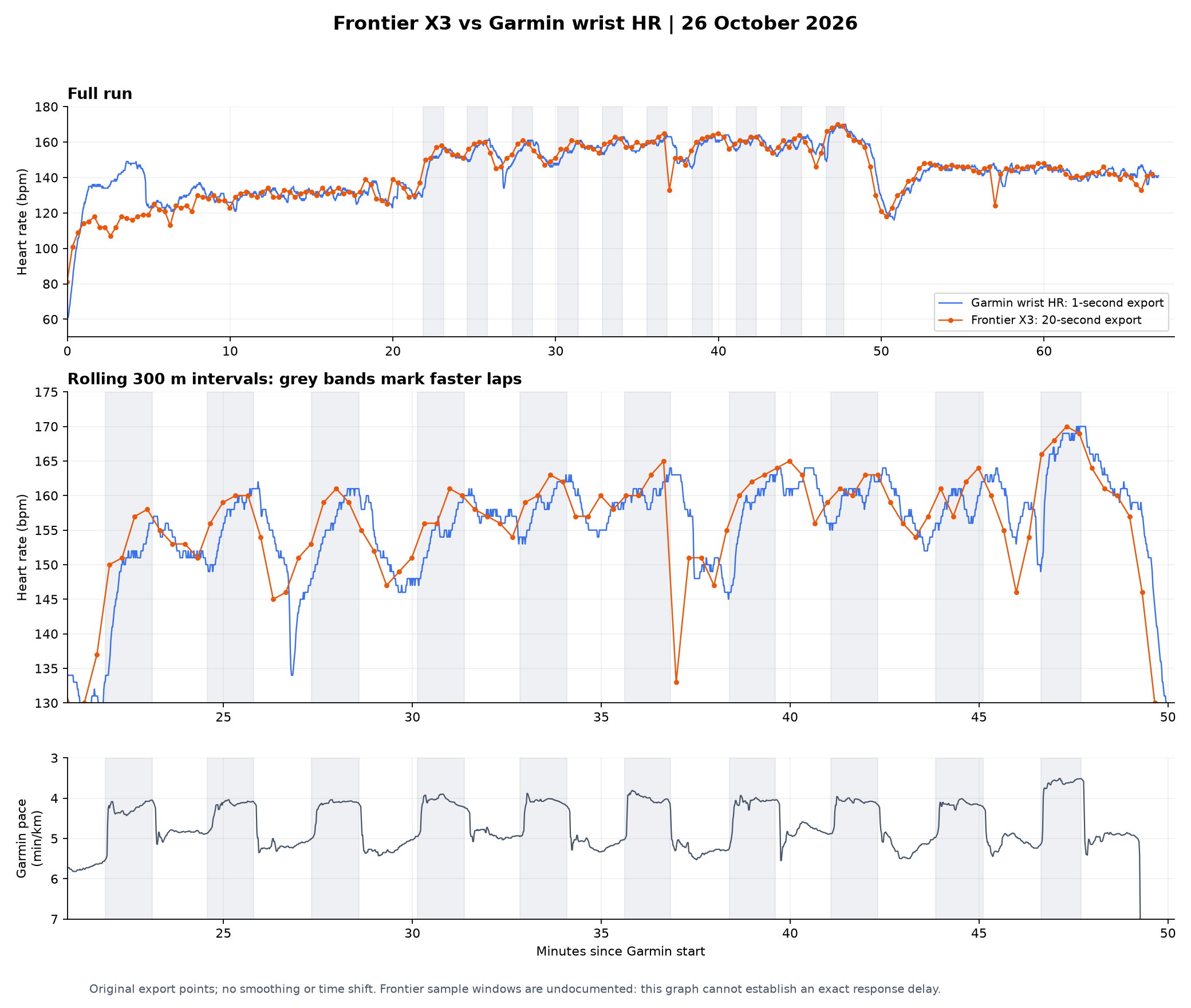
Orange shows the Frontier export; blue shows Garmin wrist heart rate. The shaded bands mark the faster 300 m laps. The pace trace below gives the changes in effort some context.
Open the comparison graph at full size.
The graph gives some context to what I noticed on the screens: both recordings follow the changing effort, but they don’t always move together. For me, the useful finding was seeing the Frontier respond promptly while I was actually running. This wasn’t a timed reaction test, so I wouldn’t attach a precise number of seconds to that impression.
Battery: still no need to recharge
The X3 arrived showing 95% battery. It now shows 90%, after around four weeks and approximately 15 hours of wear, without being plugged in.
So far, charging simply hasn’t entered the routine. That’s the practical result I care about. It isn’t a full battery-life test, and I wouldn’t turn that small change in the displayed percentage into a prediction of how many hours remain.
Pairing the Frontier X3 with Garmin was easy
I’ve now connected the X3 to my Forerunner 570, and the setup was straightforward.
With the Frontier on, I went through Watch Settings > Connectivity > Sensors & Accessories > Add New on the Garmin and added the heart-rate sensor. It didn’t turn into a troubleshooting exercise.
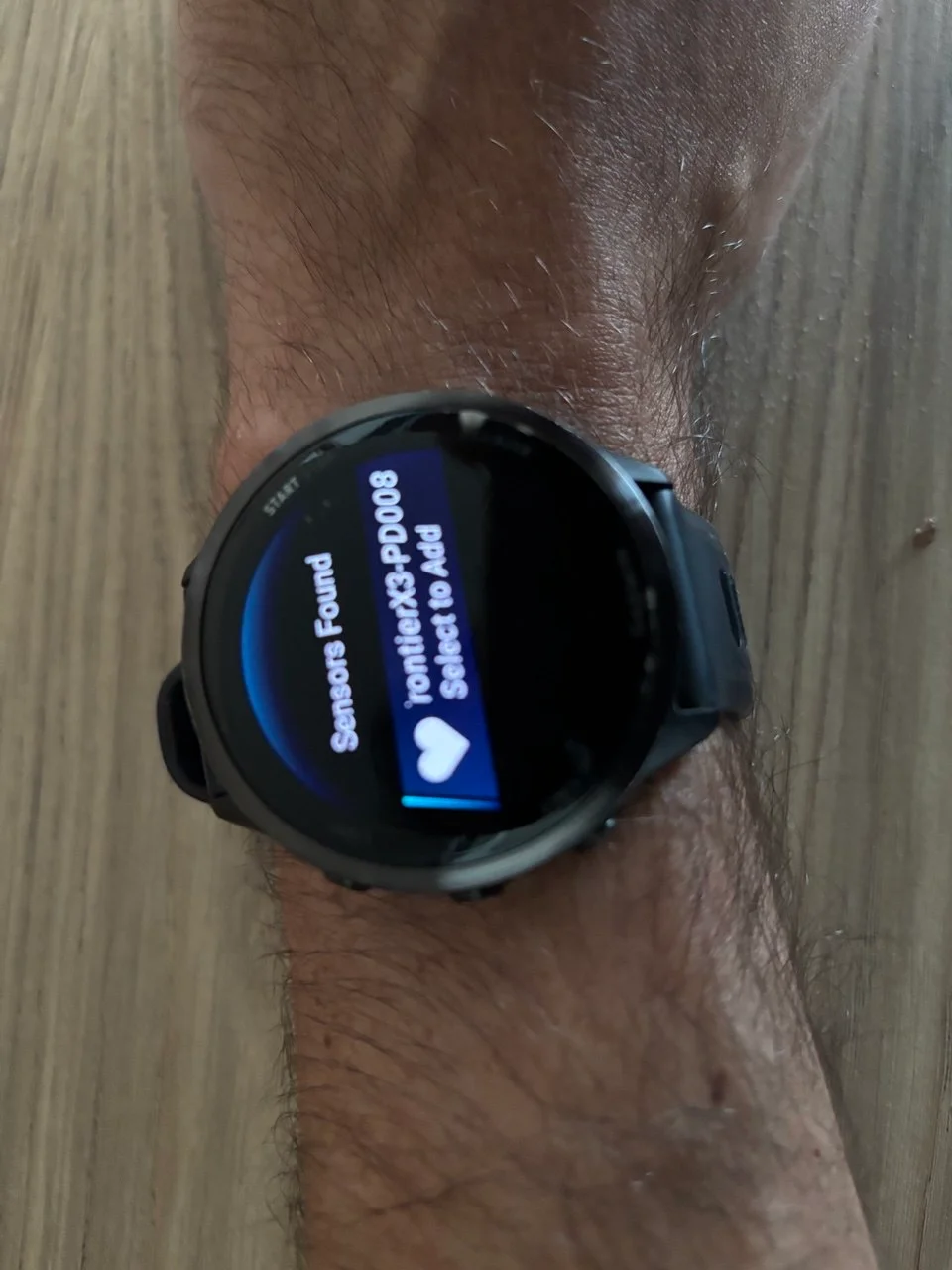
The Garmin found the Frontier X3 in the sensor menu. This photo shows the discovery step while adding it.
That answers the initial setup question. I still want more running time with the connection before judging automatic reconnection and how smoothly it works across a normal week of training.
Once Garmin is using the X3 as its heart-rate source, it isn’t an independent wrist-versus-chest comparison anymore. Today’s interval session was recorded before that pairing, specifically to keep the two measurements separate.
Sarah’s HRM Sports Bra: useful even without the sensor
Sarah’s experience with the bra is one of the clearest findings from this follow-up. It removes the need to wear a separate heart-rate strap underneath a sports bra, and she’s found it comfortable enough to choose without the sensor attached too.
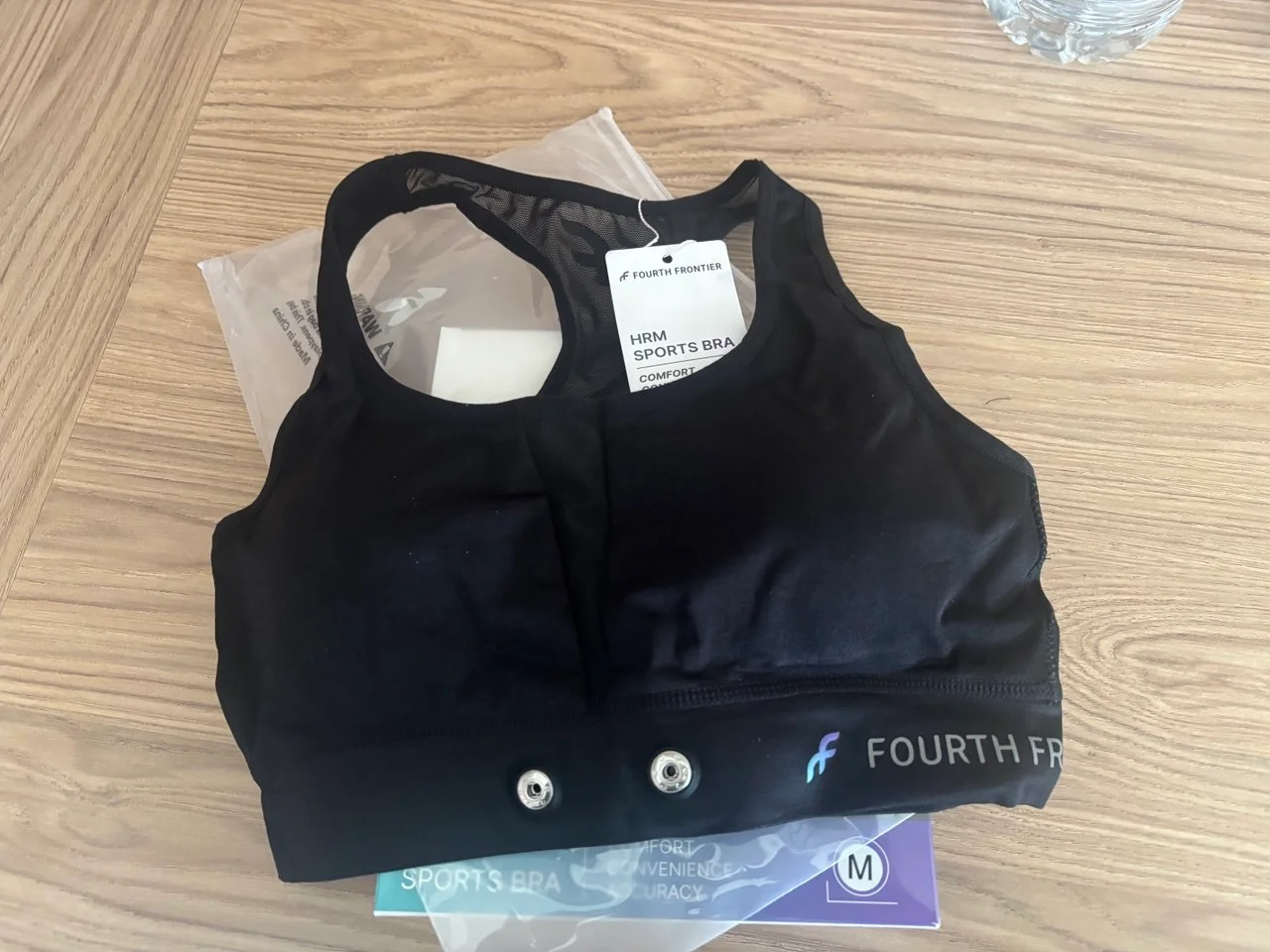
The HRM Sports Bra has the sensor attachment built into the lower band, removing the need for a separate chest strap.
The first impression took a little adjustment. The lower band sits further down than on the bras she’s used to. At first, that different position made her wonder whether the fit was a little loose.
After the first run, she confirmed that everything stayed firmly in place. The supplied size fitted well, and she has since worn it during both steady runs and intervals without discomfort.
The support is why she keeps reaching for it: everything stays secure without becoming uncomfortable.
We still need more time to judge how it holds up through repeated washing. For now, it has earned a place in her running kit on comfort and practicality.
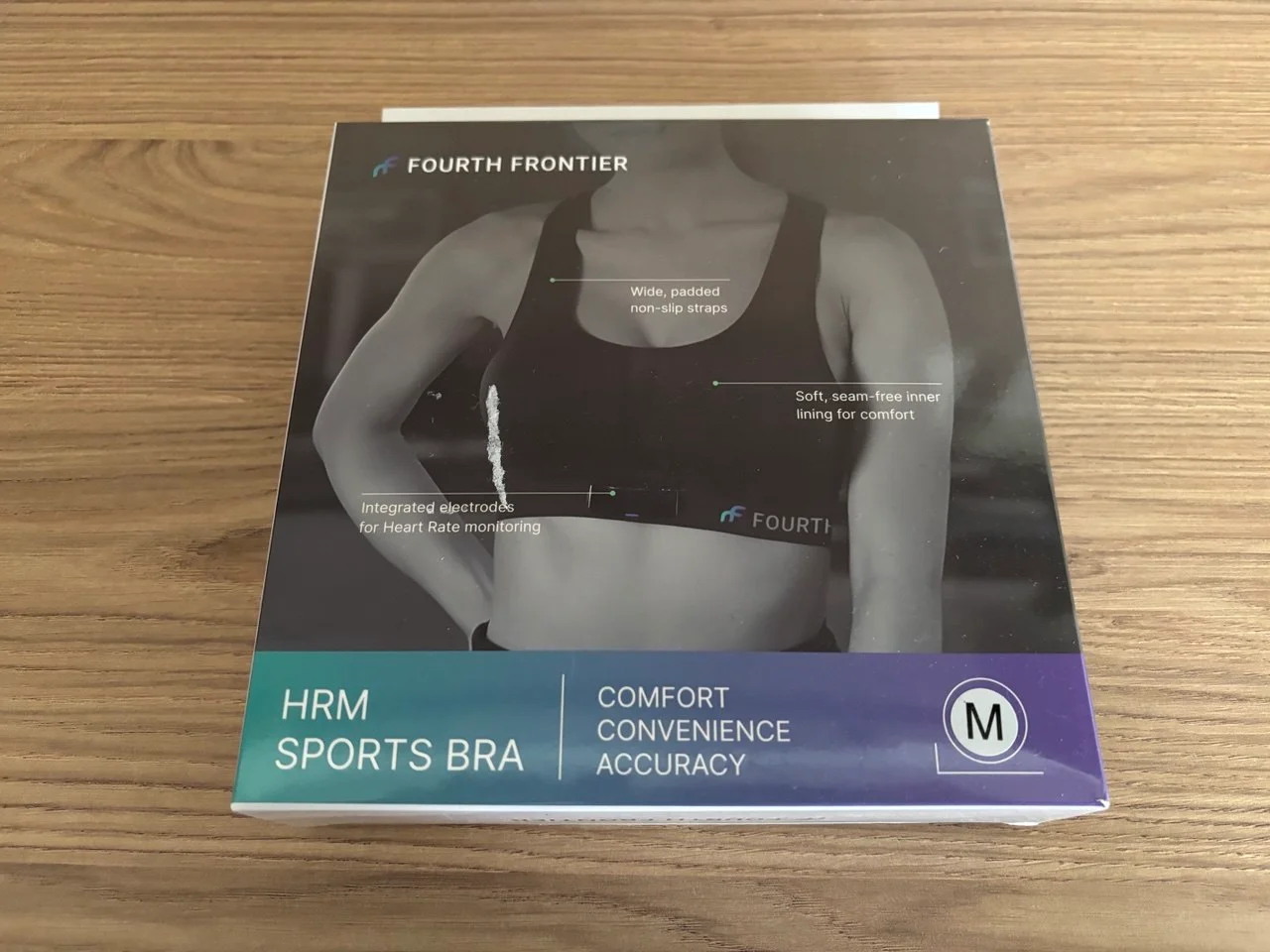
Our sample came in Medium. The lower band felt unfamiliar at first, but Sarah found the fit secure once she ran in it.
Premium: the explanation helped more than another number
Premium was newly activated when I wrote the first review. I’ve now looked more closely at the VO2max trends, oxygen-uptake information and ventilatory-threshold views. The explanations in the app are clear, and reading them made it easier to understand why the information could be useful.
The VO2max trend graph is well presented. The actual number needs context, though. Frontier shows 43.65, while Garmin currently shows 56. Runalyze gives me an effective VO2max of 48.15, with 49.10 for this particular run.
I wouldn’t pick a winner from those figures. They’re different estimates, and Runalyze’s effective VO2max also incorporates running efficiency. I’m more interested in whether the trend becomes useful over time.
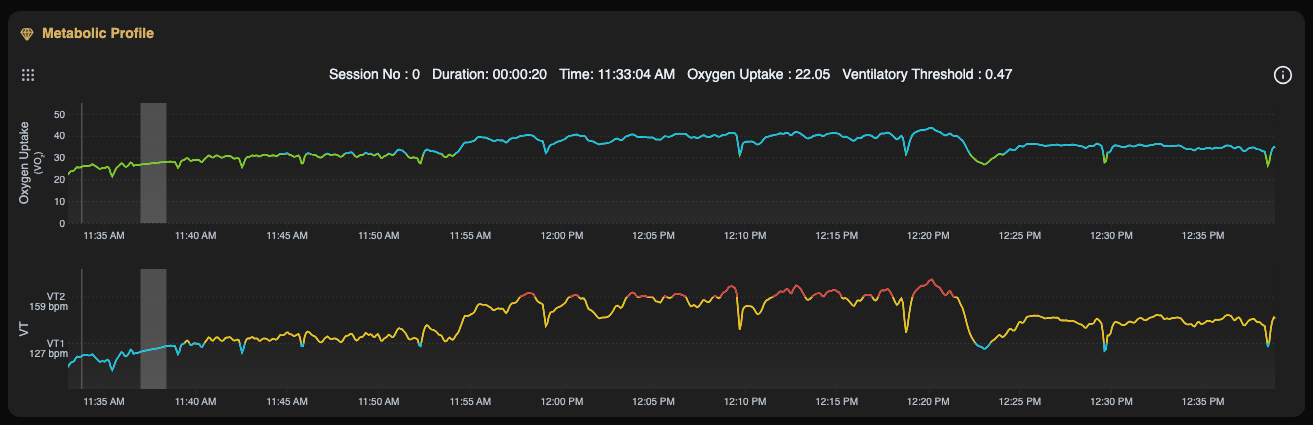
Premium’s metabolic profile from this session. The app’s explanations helped make the extra graphs more understandable.
The higher threshold on this session was 159 bpm, which lines up with my feeling that the work becomes more serious around 160. The lower threshold was 127 bpm. I still describe running up to around 150 as easy for me, so I wouldn’t say that both boundaries have been confirmed just because one feels familiar.
I’d be interested in using the threshold information to help organise training, but I’d first give it more weeks and more sessions to see how the values settle. Our heart-rate zones guide gives some wider context for training by effort and heart rate.
At this stage, I like the explanation and presentation. I haven’t yet established that Premium changes my training enough to justify an ongoing subscription. Overnight wear, sleep and recovery features remain part of the longer-term testing.
My verdict after four weeks
After four weeks, I’m very positive about the Frontier X3. It’s a very good heart-rate monitor that feels like a premium piece of running kit. The quicker response I noticed during intervals, the lack of charging hassle and the easy Garmin pairing all add to that impression.
What I appreciate most is how those things fit together. It gives me a responsive heart-rate display during harder running, while the battery is still at 90% after around 15 hours of use without a recharge. Adding it to my Garmin was straightforward too. Those are useful differences in the actual experience of owning it.
Sarah is equally positive about the bra. She finds it supportive and comfortable during both steady running and intervals, and chooses it even without the sensor. For her, it works as a running bra first, with the convenience of integrated heart-rate monitoring on top.
The Premium subscription is a separate decision. I like the explanations and the trend views, but want more time with the features before deciding whether I’d keep paying for them. That doesn’t take away from my opinion of the device itself: the X3 has made a strong impression, and I’m happy to keep using it as the longer-term testing continues.
A simpler chest heart-rate monitor remains an option if all you want is heart rate on a watch. For me, the X3’s premium feel and the experience so far make it a convincing package.
If the X3 looks like a fit for your training, RunnersPicks readers can get 30% off using code RUNNERSPICK30.
FAQ
Was the Garmin using Frontier heart rate during the interval comparison?
No. Garmin used its own wrist sensor and Frontier recorded separately. The devices were paired afterwards.
Did the Frontier X3 react faster during intervals?
Jos noticed the Frontier display respond sooner when he changed pace while checking both screens. The exports don’t support a precise claim in seconds, or prove that the X3 is always more accurate.
Has the Frontier X3 needed charging after four weeks?
No. It arrived at 95% and showed 90% after approximately 15 hours of wear across four weeks. That isn’t a full battery-life test.
Can the HRM Sports Bra be worn without the sensor?
Sarah wears it that way too. She likes the support and has found it comfortable during steady runs and intervals.
Has this review tested sleep and recovery overnight?
No. Overnight wear and a fuller assessment of those features are reserved for the later long-term review.