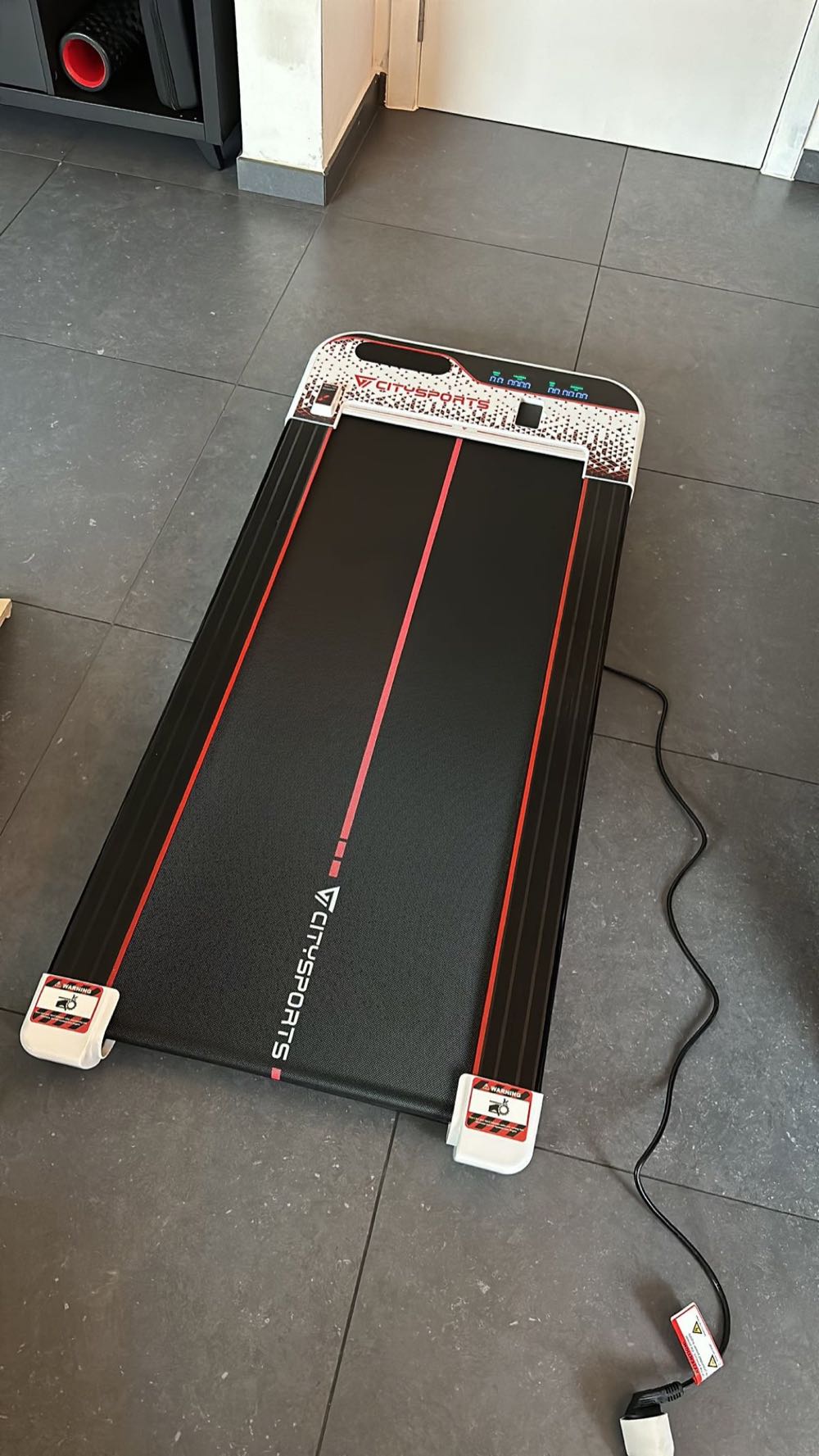
My Walking Pad Review: CitySports Budget Under-Desk Treadmill
I work from home. I have meetings that could have been emails. And I have a standing desk. At some point the obvious question presented itself: what if I could walk during those meetings instead of just standing there?
That is how I ended up buying a CitySports walking pad. Not as a running tool. Not as a serious treadmill. Just as a way to move my legs while listening to status updates and sprint planning sessions.
I have been using it for over a year now, and my wife used it extensively during her postpartum recovery. Here is the honest review.
What Is a Walking Pad?
A walking pad is a stripped-down treadmill designed specifically for walking. No handrails. No incline. No fancy display. Just a flat belt that moves under your feet at walking speeds.
The appeal is simplicity and size. Walking pads slide under a desk or couch when not in use. They are quiet enough for video calls. And they cost a fraction of a real treadmill.
The CitySports model I bought is one of the budget options in this category. There are plenty of alternatives at similar price points, mostly from Chinese brands with varying quality levels. CitySports is one of the more established names in the budget segment.
Specifications
Here are the key specs of my CitySports walking pad:
- Maximum speed: 6 km/h
- Minimum speed: 1 km/h
- Belt size: approximately 100cm x 40cm
- Weight: around 25kg
- Noise level: very quiet (I use it on video calls without anyone noticing)
- Control: remote control and foot-pressure speed zones
- Folding: folds flat for storage under furniture
- Price paid: approximately EUR 250
The critical number there is the 6 km/h maximum. That is a brisk walking pace, nothing more. You cannot run on this device. Even jogging at that speed feels awkward because the belt is too narrow and there are no handrails to grab if you stumble.
How I Use It
My primary use case is walking during video meetings. Here is my typical routine:
Morning standup (15 min): Walk at 3 to 4 km/h. Camera on, nobody notices.
Long meetings (45 to 60 min): Walk at 4 to 5 km/h with camera off. I mute when not speaking, though the noise is low enough that it barely registers even unmuted.
Admin time (email, Slack, reading docs): Walk at 5 to 6 km/h. Full pace because I do not need fine motor control for keyboard work.
On a typical work day, I accumulate 5,000 to 8,000 extra steps purely from walking pad use. That is 3 to 5 km of walking that would not have happened otherwise. Over a week, that is 15 to 25 km of gentle movement on top of my actual running.
The health benefit is not about burning calories or replacing running. It is about avoiding the metabolic damage of sitting for 8 hours straight. Regular low-intensity movement throughout the day improves blood flow, reduces insulin resistance, and keeps joints mobile. All of this supports recovery from actual running sessions.
My Wife’s Postpartum Use
This is where the walking pad proved its value beyond my meeting-walking habit.
After our third child, my wife could not run for months. The pregnancy had been complicated, and the recovery period was long. But she could walk. The walking pad allowed her to get daily movement without leaving the house, without needing childcare, and without weather being a factor.
She used it for 20 to 40 minutes daily at 4 to 5 km/h during the baby’s nap times. It was low impact enough to be safe during recovery, but enough movement to maintain some fitness and support mental health during a difficult period.
When she eventually transitioned back to running, she felt the walking pad months had maintained enough baseline fitness that the return was smoother than expected. The pad was not a running substitute, but it was a genuine bridge during a time when running was not possible.
What It Cannot Do
Let me be very clear about the limitations:
You cannot run on it. 6 km/h is not running for anyone. If you are looking for indoor running capability, this is the wrong product. You need an actual treadmill for runners.
No incline. The belt is completely flat. You cannot simulate hills, which means you miss the strengthening benefit that incline walking provides.
No structured workouts. There is no app integration, no workout programs, no speed intervals. It is just a belt that moves. You control the speed manually with a remote.
The belt is narrow. At 40cm wide, you need to walk in a straight line. Any lateral movement and you are stepping off the belt. This is fine for walking but would be dangerous at higher speeds.
Build quality is “budget.” The frame creaks slightly. The remote is cheap plastic. The display (a small LED showing speed) is barely readable. None of this matters for functionality, but if you expect premium feel, look elsewhere.
Noise Level: The Key Feature
The single most important characteristic of a walking pad for my use case is noise. If I cannot use it during video calls, it is useless to me.
The CitySports model is genuinely very quiet. At speeds up to 4 km/h, it produces a soft hum that does not register on microphone pickup. At 5 to 6 km/h, there is slightly more motor noise, but it is still quieter than an office fan.
My colleagues did not know I was walking during calls until I mentioned it. That is the bar for “quiet enough.” If your microphone picks up the sound, you cannot use it in meetings, and that kills the primary value proposition.
For a broader comparison of walking pads versus traditional treadmills, the noise difference is dramatic. Even the quietest proper treadmill is noticeably louder because of belt size, motor power, and impact absorption differences.
Who Should Buy a Walking Pad?
A walking pad makes sense if:
- You work from home and spend hours in meetings or at a desk
- You want to increase daily step count without dedicated exercise time
- You are recovering from injury or pregnancy and need low-impact movement
- You have limited space and need something that stores flat
- Your budget is EUR 200 to 300, not EUR 1000+
A walking pad does NOT make sense if:
- You want to run indoors (get a proper treadmill)
- You want to use incline for training (no walking pad offers this)
- You expect it to replace actual running sessions
- You need structured workout programs
Would I Buy It Again?
Yes, but with a caveat. For the specific purpose of walking during meetings, it is excellent value. I use it almost every workday. It has added thousands of kilometers of gentle movement to my life that would not have happened otherwise.
However, if I could only have one indoor movement device, I would benefit more from an actual running treadmill that could handle real training sessions on rainy days or during winter darkness. The problem is that I am not a fan of indoor running. I find it mind-numbingly boring compared to outdoor running, and I would rather dress for weather than stare at a wall.
So the walking pad fills a niche that a treadmill technically could also fill (walking during meetings), while the treadmill adds running capability I probably would not use anyway. For my personality and habits, the walking pad is the right tool.
Tips For Using a Walking Pad During Work
If you are considering this setup, here are practical tips from a year of daily use:
Start slow. Walking and typing simultaneously takes a few days to feel natural. Start at 2 to 3 km/h and increase as your body adapts.
Invest in a good standing desk mat. When you are not on the pad, you still want comfortable standing. I alternate between walking and standing throughout the day.
Position your monitors correctly. When walking, your head bobs slightly. Make sure your screen is at the right height for this slightly different posture.
Wear shoes. Walking barefoot on the belt is possible but uncomfortable for longer sessions. Light sneakers or even slippers with grip work well.
Track your steps separately. Your running watch will count walking pad steps as regular steps. If you want to distinguish between “real” outdoor movement and pad walking, you will need to manually note the difference.
Keep the remote accessible. You need to stop quickly sometimes (someone at the door, need to write something precise, stepping off for a break). The remote should be within arm’s reach at all times.
The Bigger Picture: Movement vs Training
I want to be clear about what a walking pad is and is not. It is not a training tool. It does not make you a better runner. It does not provide meaningful cardiovascular stimulus for anyone who already runs regularly.
What it does is increase your non-exercise activity thermogenesis (NEAT), which is the energy you burn through daily movement that is not structured exercise. For someone who works from home and might otherwise sit for 8 to 10 hours per day, this matters more than you think.
Higher daily movement supports better recovery between running sessions. Better blood flow. Better joint health. Better metabolic function. These are all small contributions that compound over time.
For EUR 250 and the space under my desk, that is a trade I am happy with.
FAQ
Can you actually type while walking on a walking pad?
Yes, but it takes a few days of adjustment. At 3 to 4 km/h, most people can type normally within a week of practice. At higher speeds (5 to 6 km/h), fine motor control decreases slightly. I do most of my focused typing work while standing still and use the walking pad for meetings, reading, and lighter tasks.
How long does a CitySports walking pad last?
I have used mine for over a year with daily use (approximately 30 to 60 minutes per day) and it still works perfectly. The belt shows some wear but functions fine. Budget walking pads generally last 2 to 4 years with regular maintenance (occasional belt lubrication). Motor failure is the most common end-of-life issue.
Is a walking pad worth it if I already run regularly?
Yes, but for different reasons than you might think. It does not improve your running fitness. But it increases daily movement, supports recovery through gentle activity, and gives you something to do during otherwise sedentary work hours. If you work from home and sit a lot between runs, it is a worthwhile investment.
Does walking pad use count toward daily step goals on Garmin?
Yes. Your watch cannot distinguish between outdoor walking and walking pad walking. All steps count toward your daily goal and weekly intensity minutes. My step count jumped from 8,000 to 12,000 average daily after getting the walking pad, purely from meeting-walking.
Are Chinese walking pad brands reliable?
It varies. CitySports has been around for several years and my experience has been positive. Cheaper no-name brands from marketplaces can be hit or miss. Key things to check: motor warranty (at least 1 year), belt width (minimum 40cm), and maximum user weight rating. I covered more options in my budget walking pad comparison.